
Shelf — what’s on yours?
koodosBooks & Reference
4.5253.00 Reviews
- Version
- 2.90.3
- Installs
- 1.00M
- Age Rating
- Teen
Screenshots

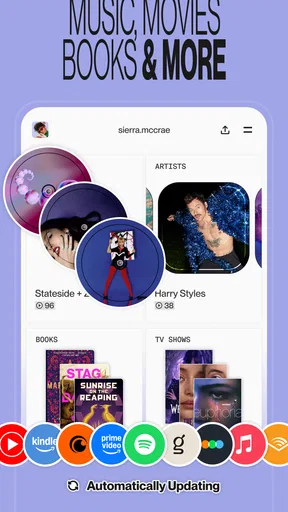
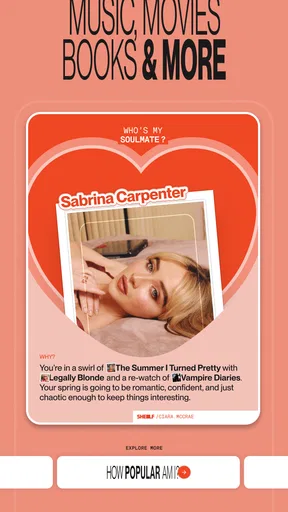
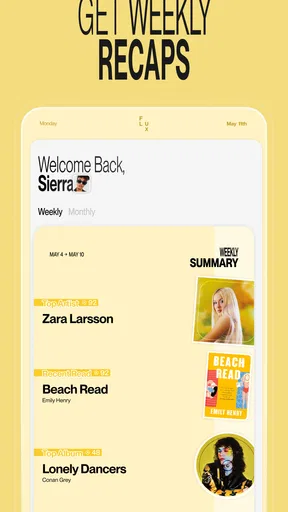
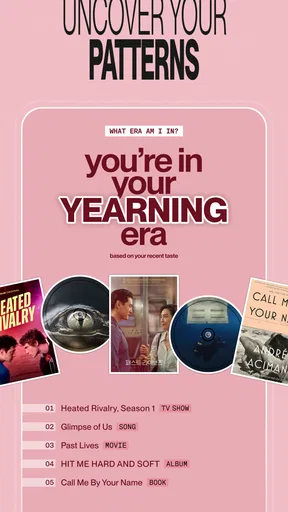
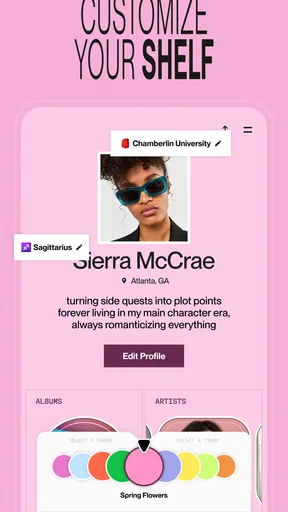
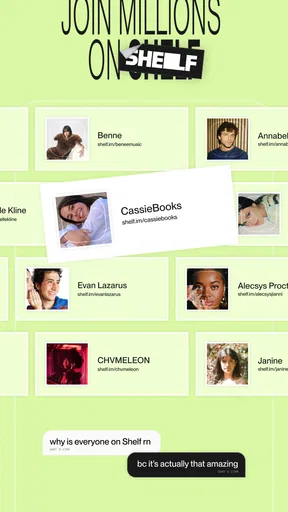
Our Review of Shelf — what’s on yours?
 Analysis by Appyee
I like apps that help me remember the things I enjoy, but many of them turn that simple idea into a complicated catalog. Shelf takes a quieter approach. It is a free Books & Reference app from koodos built around keeping track of what I am watching, reading, or listening to during the week. That makes it less like a full personal database and more like a lightweight record of my current cultural life.
After spending time with it, I found the appeal is not in collecting endless details. The useful part is the habit: when I finish an episode, pick up a book, or spend an evening with an album, I have somewhere focused to put that moment. Shelf works best as a simple memory aid for media, not as a replacement for every specialized tracking service.
What Shelf is really for
The app sits in the Books & Reference category, although its scope reaches beyond books. Its central idea is to capture the media that has occupied my attention recently. The short name, “Shelf,” suggests a collection, but I found it more helpful to think of it as a personal snapshot: what I am following now, what I have just finished, and what I want to remember later.
That distinction matters because it changes how I use it. I do not open it expecting a detailed reading planner, a streaming guide, or a social network. I open it when I want to preserve a small piece of my week without writing a long note. The app’s strength is the low commitment involved in recording something.
For example, imagine a typical Saturday. I read several chapters in the morning, watch a film in the afternoon, and listen to a new album while cooking. Instead of relying on a vague memory or scattering those items across different services, I can bring them together in one place. The result is not a review of my taste; it is a compact record of how I actually spent my free time.
That makes the app particularly suitable for people who move between formats. A dedicated book tracker may be better for someone who wants reading goals, editions, page counts, or a carefully maintained library. A music service may already handle listening history more automatically. Shelf becomes interesting in the space between those tools, where I want one human-scale overview rather than a separate system for every kind of media.
Cost and what free access means
Shelf is free to use, which gives it an easy advantage for anyone who wants to try a personal media log without making a purchase decision first. I can test whether the recording habit fits my routine instead of committing money before knowing whether I will keep using it.
That free price also sets a sensible expectation. I judge the app mainly by how quickly it helps me capture something and how pleasant it is to revisit later. I would not choose it solely because it replaces every premium feature found in specialist reading, film, or music services. Its value is in convenience and focus, not in promising an all-purpose media-management system.
The app has a Teen content rating, so it is presented for a broad audience beyond young children. I would still treat it as a personal organization tool rather than assume it is designed around family supervision or child-specific discovery. Someone choosing an app for a younger child should consider whether a simple personal shelf is appropriate for that child’s needs.
The small workflow that makes it useful
My preferred way to use Shelf is to record items at the moment they become meaningful, then return later when I have more time. I do not try to build a perfect back catalogue on the first day. That usually creates unnecessary work and makes a simple app feel like an administrative task.
A better workflow is to begin with the current week. I add the book on my bedside table, the show I am actively watching, and the music I keep returning to. At the end of the week, I look back and decide which entries are worth keeping as part of my longer-term record. This approach gives the app a useful rhythm without turning it into a daily obligation.
There is also a subtle benefit to mixing formats. If I only track books, I may judge my week by how many pages I completed. When I include watching and listening too, the record becomes a more honest picture of my attention. A week with little reading may still contain a memorable documentary or an album I played repeatedly. Shelf gives those activities a shared place.
One practical tip is to use it as a conversation memory. When a friend asks what I have enjoyed recently, I can look at the shelf instead of trying to reconstruct the answer from memory. That is more useful than it sounds, especially when several weeks have passed and individual titles have started to blur together.
Where it differs from familiar alternatives
The usual alternatives tend to be specialized. Book-focused apps are often strongest when I want detailed progress, reading challenges, or a large collection organized around authors and editions. Streaming platforms are better at automatically remembering what I played or watched inside their own services. Notes apps offer flexibility, but they require me to create and maintain the structure myself.
Shelf occupies a narrower but appealing middle ground. It gives media tracking a dedicated home without asking me to build a spreadsheet or maintain several separate lists. The trade-off is that a general shelf may not offer the depth that a specialist expects. If my main goal is analyzing reading speed, cataloging every version of a book, or managing a serious watchlist, I would look elsewhere first.
I also appreciate that the app’s concept encourages selection. A notes app can become a dumping ground for links, half-formed recommendations, and unrelated reminders. A shelf feels more intentional. I am more likely to keep entries that represent what I genuinely spent time with, rather than everything I might possibly consume someday.
That simplicity can be a limitation for users who want discovery. I would not install it expecting a large recommendation engine or a replacement for a streaming catalog. Its job, as I experienced it, begins after I have chosen something—or while I am already engaged with it. It helps me remember my choices; it is not primarily there to make those choices for me.
Useful habits beyond basic logging
The first non-obvious use is creating a weekly attention check. Instead of asking whether I was “productive,” I can look at what actually filled my downtime. Seeing books, shows, and listening choices together can reveal patterns: perhaps I keep starting long books but finish short ones, or I repeatedly return to familiar music when I am busy. That kind of reflection is more personal than a simple completion count.
The second is using the shelf to protect recommendations from disappearing. Friends often suggest something at exactly the wrong moment, when I cannot start it immediately. Rather than trusting myself to remember the title, I can place it in my media record and revisit it when I have room. The important discipline is to distinguish something I want to try from something I have actually experienced, so the shelf remains meaningful.
The third is using it as a lightweight end-of-month review without turning it into a performance report. I can scan the entries and choose a few standouts to discuss, recommend, or revisit. This is especially helpful for people who enjoy keeping a personal cultural diary but dislike writing long diary entries.
A fourth useful trade-off is intentional incompleteness. I do not need to enter every episode, every casual song, or every abandoned book unless that level of detail matters to me. A selective record is faster and often more enjoyable to revisit. Users who want exhaustive history may find that approach unsatisfying, but users who want a clean memory of meaningful choices may prefer it.
Things that may frustrate careful organizers
The same simplicity that makes Shelf approachable may feel restrictive if I want a highly structured archive. Before adopting it as my only media tool, I would decide what I actually need to remember. If the answer includes extensive metadata, detailed milestones, complex categories, or rigorous statistics, a specialist app is likely the better fit.
There is also a habit-building risk. An app that depends on manual capture can lose value when I forget to add something. Automatic histories inside reading, video, or music platforms may be more reliable for users who want every activity recorded without interruption. Shelf is better for deliberate highlights than for invisible, complete surveillance of my media use.
Another consideration is the difference between a personal shelf and a social recommendation service. I would not choose it mainly to follow friends, debate reviews, or discover a constant stream of new releases. Its appeal is private organization and reflection. Anyone looking for an active community should compare it with a platform built around social interaction instead.
The current version is 2.49.0, and the app has already attracted more than a million installs, with an average rating of 4.0 from roughly six thousand ratings. Those figures suggest a substantial audience and a generally positive reception, but they do not remove the need to test the workflow personally. A tracking app can be well liked and still be a poor match for someone who wants deep cataloging.
Who will get the most value
I would recommend Shelf to someone who regularly switches between books, shows, and music and wants one uncomplicated place to remember them. It is also a good match for a person who has tried using notes or spreadsheets but abandoned them because maintaining the system became more work than the memory was worth.
It suits casual readers who want to recall what they finished, people who like discussing recent viewing, and listeners who want to preserve the albums that shaped a particular period. It can also help anyone trying to become more intentional about leisure. Seeing a record of actual choices makes it easier to notice whether my free time reflects what I value.
I would be more cautious recommending it to a dedicated bibliophile, film archivist, or data-minded collector. If the pleasure comes from sorting editions, tracking detailed progress, assigning elaborate ratings, or maintaining a complete historical database, the app’s lighter approach may feel too thin. In those cases, a specialized service is a better investment of attention, even though Shelf itself is free.
I would also skip it if I want automatic tracking above all else. The app makes sense when I am willing to participate in the record. Someone who wants every listen and viewing captured in the background may prefer the built-in history tools of their existing media services.
My verdict on trying it
For me, Shelf succeeds because it respects the difference between remembering media and managing media. It does not need to become a giant database to be useful. A free, focused place for recording what has mattered during the week can be surprisingly valuable, especially when my reading, watching, and listening habits otherwise live in separate worlds.
I would start with a small experiment rather than importing an entire lifetime of favorites. Use it for a week, add only the titles that genuinely occupied your attention, and see whether revisiting that record feels useful. If it helps you remember conversations, recommendations, and personal highlights, it has earned a place in your routine.
My recommendation is to try Shelf if you want a calm cross-media memory aid, while choosing a specialist tracker if detailed cataloging or automatic history is your priority. The free access makes that decision low-risk, and the app’s best value comes from the habit it encourages: paying attention to what you consumed, then giving those choices a place to stay.
As an app from koodos in Books & Reference, Shelf has a clear identity rather than trying to solve every organization problem. I would not call it essential for everyone, but I can see myself recommending it to a friend who keeps saying, “I know I watched something good recently—I just cannot remember what it was.”
Privacy and Permissions
See what permissions an app requests and how it handles your data.
- Contacts
- read your contacts
- Location
- approximate location (network-based), precise location (GPS and network-based)
- Camera
- take pictures and videos
- Other
- view network connections, change network connectivity, full network access, run at startup, control vibration, prevent device from sleeping
Verdict
Strengths of Shelf — what’s on yours?
- Quickly catalogs books, movies, games, and other personal items.
- Clean interface makes browsing your collection simple and enjoyable.
- Useful search and filtering tools help locate items quickly.
- Supports tracking what you own, want, or have already experienced.
- Personal lists make it easier to organize recommendations and plans.
Limitations of Shelf — what’s on yours?
- Initial cataloging can take considerable time for large collections.
- Some item details may be missing or inaccurate in the database.
- Limited features may feel basic for users wanting advanced collection tools.
- Requires consistent updates to keep ownership and status information current.
- Social or sharing options may not meet the needs of every user.
Similar Picks in This Category
View All
Google Play Books & Audiobooks
Google LLC4.7

네이버 - NAVER
NAVER Corp.3.5

Wattpad - Read & Write Stories
Wattpad.com3.7

King James Bible - Verse+Audio
Ozion4.8

Bible Offline-KJV Holy Bible
Bíblia Offline4.9

Amazon Kindle: Reading App
Amazon Mobile LLC4.8
Frequently Asked Questions
What is Shelf — what’s on yours?
Shelf — what’s on yours? is a personal organization app designed to help you collect, arrange, and revisit the things you own or want to keep track of. You can use it as a visual inventory for books, games, movies, products, collectibles, or other personal items. Its usefulness depends on how consistently you add information and organize your shelves, so it is best suited to users who enjoy keeping a clear digital record of their belongings.
What can I use Shelf — what’s on yours? for?
The app can be useful for creating personal collections and organizing them into shelves or categories. For example, you might create separate spaces for books you own, games you have completed, films you want to watch, or items you plan to buy. It can also help you remember what you already have before making a purchase. The exact experience may vary depending on the available cataloging and customization features.
Is Shelf — what’s on yours? easy to use for beginners?
Shelf — what’s on yours? is generally aimed at users who want a simple way to manage collections without relying on spreadsheets or complicated inventory software. New users should be able to begin by creating a shelf and adding items, although building a large, detailed collection can take some time. Before downloading, check whether the app’s interface, search tools, and organization options match the way you prefer to catalog things.
Does Shelf — what’s on yours? require an account or an internet connection?
Whether an account is required, and how much of the app works offline, can depend on the current version and platform. Some collection apps use accounts to synchronize shelves across devices, save data securely, or provide backup features, while others allow local use. Review the app-store listing and privacy information before installing, especially if you want to avoid registration or need reliable access to your collection without an internet connection.
Is Shelf — what’s on yours? free to download, and are there any limitations?
The download and available features may differ between the Android and iOS versions. Some functions can be free, while advanced organization tools, larger collection limits, synchronization, or other extras may require an in-app purchase or subscription. It is worth checking the current store listing for pricing, supported devices, advertisements, and purchase details before downloading. Also confirm that your device meets the required operating-system version for a smooth experience.
